Once logged in, the Carnets section appears.
The ‘Carnets’ section is your main hub for managing all carnets in ATA Carnet Desktop. Whether you hold or manage shared carnets, this module offers an organized list of active and archived documents. You can quickly view details, track statuses, and perform actions like downloading, sharing, or updating carnet information, helping you efficiently manage multiple carnets and maintain compliance.
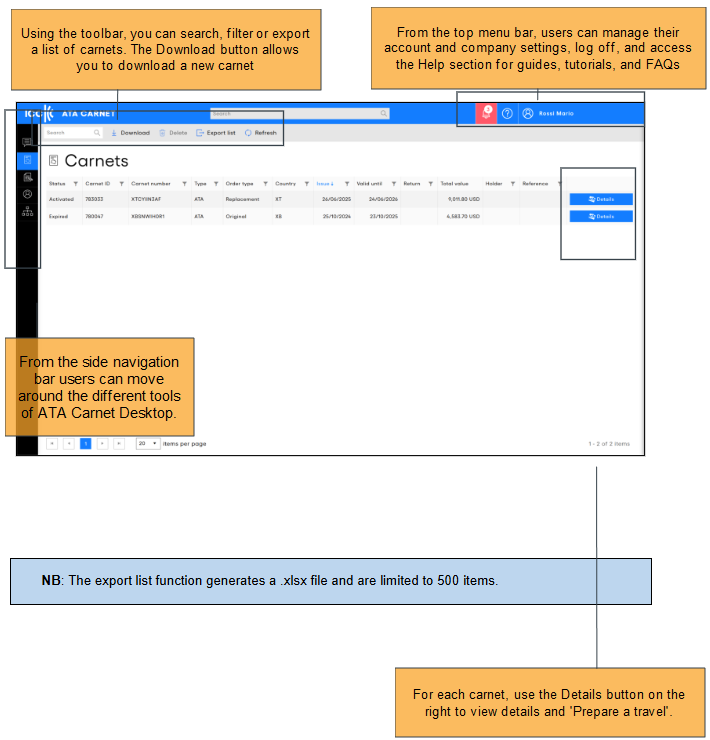
Click Download on the toolbar to start downloading a Carnet or individual transactions.
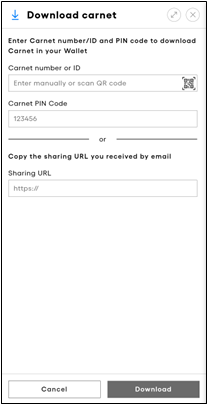
- To download the full carnet: Enter the Carnet number or Carnet ID and Carnet PIN code as supplied by the issuing association or forwarded from the ATA Carnet holder.
- Alternatively, scanning the QR Code by tapping the QR code icon allows for quicker importation, if available
- To download individual transactions shared with you: Copy the URL provided in the message from the carnet holder and paste it into the Sharing URL field.
- Click Download.
Was this article helpful?
That’s Great!
Thank you for your feedback
Sorry! We couldn't be helpful
Thank you for your feedback
Feedback sent
We appreciate your effort and will try to fix the article