Preparing a travel

Modified on Fri, 27 Mar at 2:06 PM

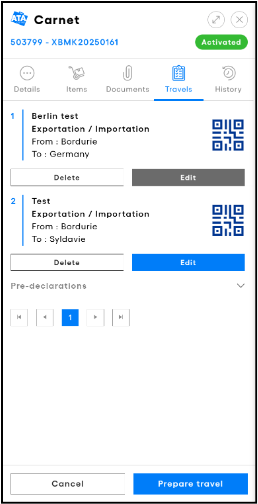
From the Carnets page, click on Details on the corresponding carnet you would like to use and then Prepare travel on the bottom of the screen.


A screenshot of a computer 
AI-generated content may be incorrect. 

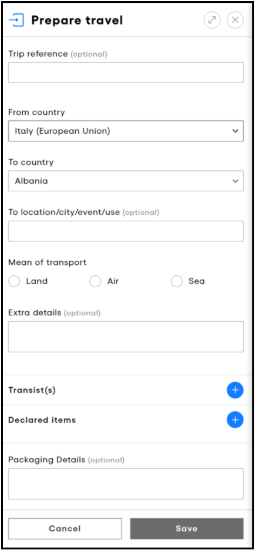
  1. Fill in the required fields. 

  1. If required and you have transit sets available, add transit countries/territories by clicking on + and selecting the countries/territories intended to transit through. 

  1. Click on + in the Declared items. 


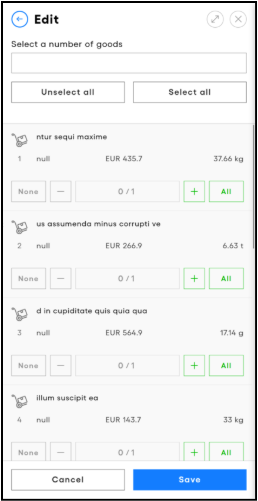
  1. Type in the goods to declare from the General List of the ATA Carnet in the field on the top of the screen to add them to the travel. Alternatively, use the + and  buttons to add individual items or you may select / unselect all. You may also click on Select all if required. 

  1. Once all goods have been added, click on Save. 

  1. Once the declaration is complete, click on Save. 


To modify a travel, open the carnet Detailsnavigate to Travels and click on Edit. After the edits have been made click Save. You may also Delete prepared travels if needed and if not yet transacted. 


Please consult the Special Scenarios chapter for comprehensive guidance on preparing a travel under specific circumstances. 


NB 

  1. Prepared travels synchronise between devices. A travel prepared on one device for a carnet will appear on another device with the same carnet downloaded. 

  1. A travel can be saved and prepared in multiple stages. Make sure all the fields are complete before going to Customs to process a transaction. 

  1. Once a travel is prepared, the holder can share one or more vouchers with his representative who shall make the declaration at customs. Please see the Sharing a voucher” section to learn more. 

  1. A prepared travel consumes 1 ‘set’ (exportation, importation, re-exportation, re-importation, transit) of the ATA Carnet. Only by deleting the prepared travel will you be topped back of the corresponding sets. 


Was this article helpful?

That’s Great!

Thank you for your feedback

Sorry! We couldn't be helpful

Thank you for your feedback

Let us know how can we improve this article!

Select at least one of the reasons
CAPTCHA verification is required.

Feedback sent

We appreciate your effort and will try to fix the article