Scope of this page:

This section provides a high‑level architectural overview of the ATA Carnet System.

It does not describe operational procedures, user actions, or integration steps.
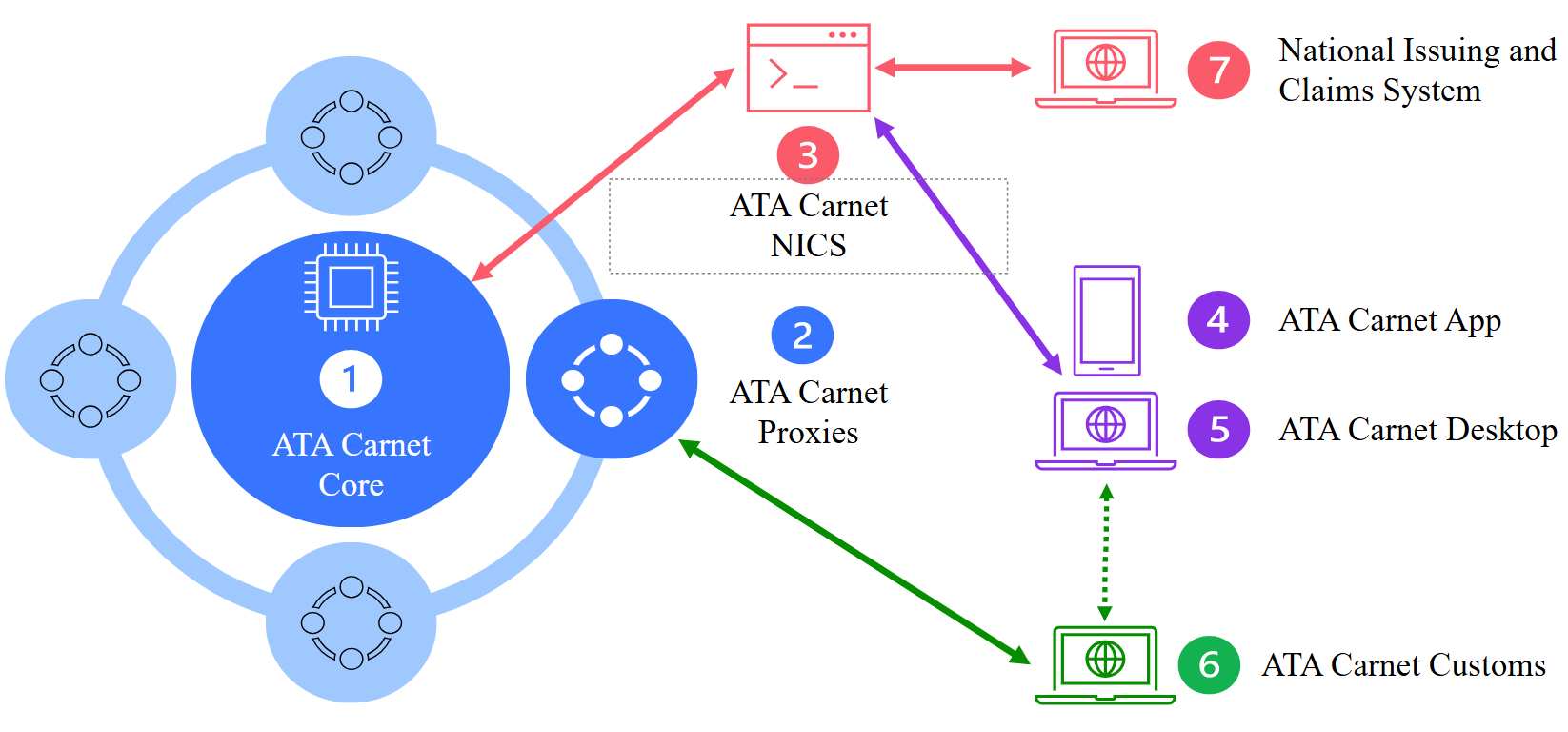
The ATA Carnet System consists of six main components, all provided and managed by ICC, together with national systems operated by National Guaranteeing Associations (NGAs) and Customs authorities.
Each component has a clearly defined role in the digital ATA Carnet ecosystem.
Overview of components
ICC‑managed components:
- ATA Carnet Core (ACO)
- ATA Carnet Proxies (ACP)
- ATA Carnet NICS (ACN)
- ATA Carnet App
- ATA Carnet Desktop
- ATA Carnet Customs
National / externallymanaged components:
- National Issuing and Claims Systems (NICS) operated by NGAs / IAs
The following is a schematic representation of the different components of the ATA Carnet system and how they interact with each other.
ATA Carnet Core (ACO)
The ATA Carnet Core is the central IT system of the ATA Carnet System.
It is responsible for:
- Coordinating all system components
- Managing the full eATA Carnet lifecycle
- Ensuring secure and reliable data exchange
The Core also includes:
- Monitoring tools
- Reporting and analytics
- Alerting mechanisms
These capabilities allow ICC to supervise and manage the digital ATA Carnet environment globally.
ATA Carnet Proxies (ACP)
ATA Carnet Proxies are designed to improve performance, availability, and resilience.
Key characteristics:
- Six proxies are planned worldwide
- Each proxy:
- Improves connection speed for users
- Stores a copy of issued eATA Carnets
- Can back up other proxies in case of technical failure
Proxies ensure high fault tolerance and redundancy across the system.
ATA Carnet NICS (ACN)
The ATA Carnet NICS provides the API layer that connects National Issuing and Claims Systems to the ATA Carnet Core.
Main features:
- Standardised API for all countries
- Six regional API bases covering the entire world
- Each NGA / IA integrates through one of these bases
Through ACN, the following are synchronised:
- Carnet issuance
- Carnet lifecycle updates
- Claims‑related data
ATA Carnet App (mobile)
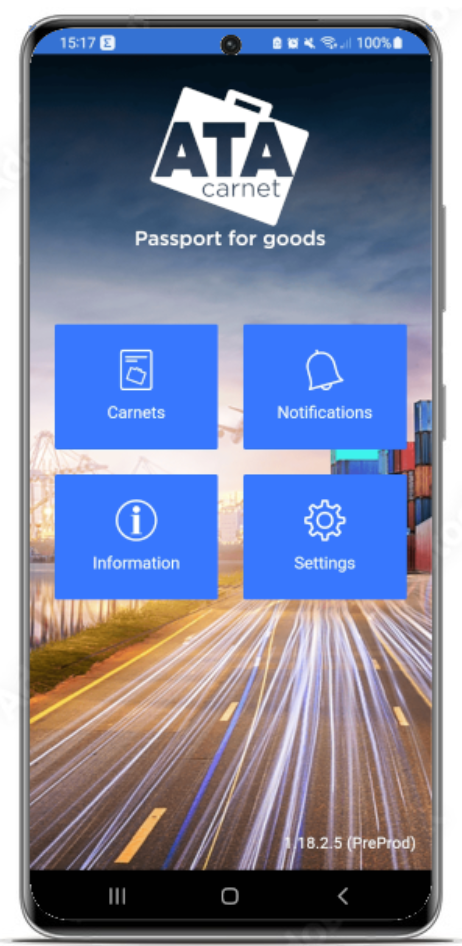
The ATA Carnet App is the mobile application (iOS and Android) for holders and representatives.
It acts as a secure digital wallet and allows users to:
- Download and store eATA Carnets
- Prepare border crossing declarations
- Generate QR codes for specific transactions
- Receive real‑time transaction confirmations
Additional points:
- Each user has a personal profile
- Carnets are accessible from any connected device
- At the border, users simply present the QR code to Customs
ATA Carnet Desktop
ATA Carnet Desktop is a web application providing the same core features as the mobile app.
It is particularly useful for:
- Company managers handling multiple carnets
- Freight forwarders managing carnets for several clients
Key benefits:
- Easier sharing with team members and partners
- Clear tracking of carnets across countries
- Same login credentials as the mobile app
Access URL:
https://app.atacarnet.iccwbo.org
Users must select the country of issuance to access the correct portal.
ATA Carnet Customs
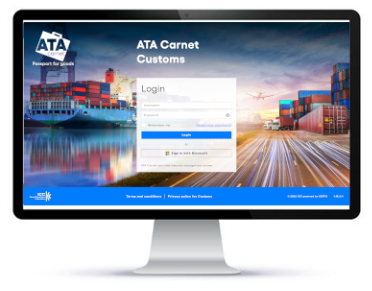
ATA Carnet Customs is the component dedicated to Customs authorities.
It enables Customs officers to:
- Access carnet data digitally
- Process and validate border transactions
- Detect potential claims through virtual voucher reconciliation
- Coordinate claims with National Guaranteeing Associations
Customs authorities can:
- Use ICC’s standard ATA Carnet Customs interface, or
- At a later stage, integrate their own national systems with ICC services
ATA Carnet Customs portals
ATA Carnet Customs is available via country‑specific URLs:
- Belgium: https://customs-be.atacarnet.iccwbo.org
- Switzerland: https://customs-ch.atacarnet.iccwbo.org
- China: https://customs-cn.atacarnet.iccwbo.org
- Russia: https://customs-ru.atacarnet.iccwbo.org
- United States: https://customs-us.atacarnet.iccwbo.org
General format:https://customs-XX.atacarnet.iccwbo.org (where XX is the ISO‑2 country code)
National Issuing and Claims Systems (NICS)
National Issuing and Claims Systems are developed and operated by NGAs / IAs.
Important notes:
- These systems are not standardised
- Each country manages issuance and claims according to national rules
- Integration with ICC is done via ATA Carnet NICS (ACN)
Through integration, all data exchanged with ICC is standardised and secured.
National systems interact continuously with the ATA Carnet Core for:
- Issuance
- Additional sets or replacement carnets (if available)
- Cancellation, blocking, or termination of carnets
Language and Date Format Configuration
Date and time formats in the ATA Carnet System may vary depending on the component used, the selected language, and the user’s local device settings.
Date format
- On web applications (e.g. ATA Carnet Desktop and ATA Carnet Customs), the date format is determined by the selected language:
- French → dd/MM/YYYY
- English (UK) → dd/MM/YYYY
- English (US) → MM/dd/YYYY
- On the ATA Carnet App (mobile), the date format follows the device’s system settings.
Time display
- Times are always displayed using the local timezone of the device used for access:
- On web applications, this corresponds to the browser’s local timezone.
- On mobile applications, this corresponds to the device’s local timezone.
As a result, users may observe differences in date and time formats depending on their language selection and local configuration.
Web browser requirements
For security and usability reasons, minimum browser versions are required to access:
- ATA Carnet Core
- ATA Carnet Desktop
- ATA Carnet Customs
Supported browsers
- Chromium‑based browsers (Edge, Chrome, Brave, etc.): version 140 or later
- Firefox / Mobile Firefox:version 140 or later
- Safari / Mobile Safari:version 20 or later
Was this article helpful?
That’s Great!
Thank you for your feedback
Sorry! We couldn't be helpful
Thank you for your feedback
Feedback sent
We appreciate your effort and will try to fix the article