The original document is available here Customs-Preparation-Guide-Nov-2023.
TABLE OF CONTENTS
- Preliminary Step: designate a single point of contact (SPOC).
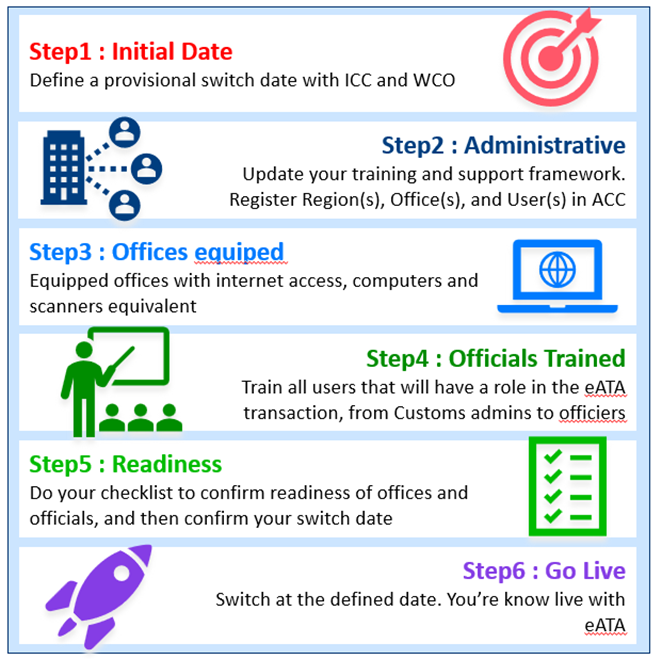
- Step 1: Define a provisional digital date
- Step 2: Administrative preparation
- Step 3: Equipment
- Step 4: Training
Customs Preparation Guide
Preamble
What is the eATA preparation phase?
Following the end of eATA Pilot Phase on 30 June 2023, the eATA project has entered into a new phase. The digital ATA Carnet System deployed by the International Chamber of Commerce (ICC) has moved from its pilot to its production standard, and stakeholders may start preparing the official use of the system. During this new preparation phase, while the Customs administrations may continue testing the system, the focus would change from giving test feedback to preparing the official acceptance of digital carnets via the ATA Carnet System.
Why was this guide created?
Tasked by the ATA/Istanbul Convention Administrative Committee (AC) of the World Customs Organization (WCO), ICC drafted the eATA Global Transition Plan (GTP) which was circulated to Contracting Parties (CPs) and discussed during the AC meeting in 2022. In the plan, Customs preparation was mentioned but a more in-depth guide was suggested, especially for those not familiar with the project as the pilot participants did. This guide is therefore created to help Customs administrations better prepare for the transition of ATA Carnet from a paper-based procedure to its digital era.
The scope of the guide:
It is divided into 6 chapters, and each chapter explains a step to be taken by Customs to prepare the official use of the system and the official acceptance of digital ATA Carnet. An Excel table is attached to the guide which includes the simulation of the workload required for each step. This would help Customs to better estimate and monitor the preparations.
We strongly recommend each country/customs territory assign a project manager to coordinate internally and communicate externally, especially with ICC, and keep the preparation on track.
Is this guide mandatory?
Like all kinds of user guides, the use of this guide is optional. If your project manager already knows what must be done or has better ways of preparing, he/she may skip some or all chapters or just use it as a checklist to complete the preparation. The goal is to make sure that your Customs administration makes effective preparations to activate the use of digital carnets via the ATA Carnet System as deployed by ICC in accordance with the GTP.
What is the scope of the guide?
The guide covers administrative steps to be taken by Customs administrations before the official use of the ICC ATA Carnet Customs (ACC), a ready-to-use web portal allowing Customs to monitor and process digital ATA Carnets declarations/transactions. The detailed functionalities of the ATA Carnet Customs and how to use them are explained separately in the ATA Carnet Customs User Guide and therefore not covered in the preparation guide.
We also take this opportunity to remind all that using ACC is required during the global transition. The integration and use of national ATA systems are not in the scope and will not be facilitated before the end of the global transition.
Abbreviation dictionary
For easy reference, all abbreviations used in the guide are gathered here:
- WCO: World Customs Organization
- ICC: International Chamber of Commerce
- SPOC: single point of contact
- AC: WCO ATA/Istanbul Convention Administrative Committee
- CPs: Contracting Parties
- NGAs: National Guaranteeing Associations
- ACC: ATA Carnet Customs
- GTP: Global Transition Plan
- MFA: Multifactor Authentication
Preliminary Step: designate a single point of contact (SPOC).
This person will act as the project manager to coordinate among parties involved in your customs’ preparation phase.
This person is the single contact point for ICC and WCO in terms of communications. This person must be able to communicate in English.
When the person is chosen, please notify your NGA. You can find your NGA here. Please include the following data of your SPOC* in the notification:
Given name |
|
Surname |
|
Email address |
|
Phone number |
|
Job title |
|
*Important note, this SPOC will be given:
- An admin account within the ICC’s ATA Carnet Customs portal to help track the preparation process.
- An account in the ICC’s ticketing support portal
Step 1: Define a provisional digital date
1.1 What does the digital date refer to?
The term ‘digital date’ in this guide refers to a date from which all carnet declarations made in your country/customs territory must be made digitally using the ATA Carnet System as deployed by ICC.
1.2 How to define the date?
Each CP should review its preparation status, estimate the time required for its preparations, and then define a provisional switch date. The date is provisional but should be realistic.
To help you assess the time required for the preparation, an Excel table is attached to the guide as a sample project management tool which includes the simulation of the workload required for each step.
It is highly recommended to have a manager monitor the progress to respect the timeline.
1.3 Who needs to be notified about the provisional digital date?
The provisional digital date must be notified by email, from the SPOC to ICC and WCO, please refer to the contact below:
1.4 Special reservation regarding the switch date notification
Please note, eATA global support is organised by ICC, and it will start only if a minimum number of countries are ready to switch. Therefore, the notification to ICC and WCO is subject to confirmation by ICC via WCO.
1.5 When should you notify the provisional digital date?
The notification of the provisional digital date should arrive at WCO and ICC at least 5 months before the said date.
Step 2: Administrative preparation
2.1 What does the administrative preparation refer to?
The administrative preparation refers to the works carried out by Customs administrations to make sure that Customs officials have sufficient knowledge of how the ATA Carnet Customs is used, what needs to be done in case of experiencing technical issues and have the competence account for use.
2.2 What tasks are covered under the administrative preparation?
Three major tasks are covered under this step:
2.2.1 Update your training framework
We assume that every country has its training programs for Customs officials on all types of Customs procedures including the ATA Carnet procedure. While it is planned to change from a paper procedure to a digital procedure, please make sure to update your training framework so that your Customs officials know how to process digital carnets and monitor them. It is essential to ensure proper training as it would enable officials to exercise their duties.
To help you develop eATA training programs, ICC has produced a set of training materials, such as ATA Carnet Customs User Guide, and eATA training videos. ICC also trained your national guaranteeing association who can be of help if needed.
Training frequency and scale might not be the same in all countries, so each Customs administration is free to determine how to use the resources available and how to organize the training.
2.2.2 Update your support framework
We assume that every country has its own Customs support framework which tells what to do if Customs officials have questions/issues in handling all types of Customs procedures including the existing paper ATA Carnets procedure.
For ATA business-related questions, such as conventions and national laws, there should be no change regarding Customs support. For questions related to the eATA tool, i.e. the ATA Carnet Customs, you may refer to the eATA global support channel established by ICC:
- Email: atacarnet-support@iccwbo.org
- Online Support: https://support.atacarnet.iccwbo.org
- Telephone: +41 58 440 1510 (reserved for urgent or operationally critical issues)
Please make sure to incorporate the eATA global support information in your support framework.
2.2.3 Setup and manage your ATA Carnet Customs portal
ATA Carnet Customs (ACC) is a free and ready-to-use web portal provided by ICC.
Please refer to the help section within the ACC.
a) Setup
The setup stage of the portal is simply about feeding it with all your existing data on regions, offices and users in charge of ATA Carnet. Once the individual responsible for creating the aforementioned objects has been determined, the project manager should establish a new Customs Administrator account for them, provided this individual differs from the project manager.
Current status: Strongly advised; not marked in this guide as mandatory.

For security reasons, individual accounts and multifactor authentication (MFA) are strongly recommended for ATA Carnet Customs users. MFA may become mandatory in a future release, and additional MFA methods may be added. This future requirement is not currently presented as mandatory in this guide.
We acknowledge that regions, offices or users account creation can be challenging and time-consuming if your country has a large number of those subjects. Manual entry takes a couple of minutes, thus depending on the quantity, you may consider using the provided import functions, please refer to the corresponding section of the guide.
For a faster first time setup you may consider: Bulk importation guide.
b) Manage
Align your onboarding and offboarding user frameworks with the ACC portal:
- Each time you onboard a new Customs official in charge of ATA Carnet, provision an ACC account for them.
- When a Customs official changes position, change their corresponding role in the system (e.g., promotion from Customs officer to Customs regional manager).
Each time you offboard a Customs official, disable or delete their accounts.
Important notice on identity management:
- We acknowledge that managing identity in a third-party software can be challenging for certain countries.
- We are actively working on adding more options to fit current identity management standards for both initial onboarding and routine account management.
- If you foresee any challenges, have your project manager contact ICC.
- Despite identity management challenges, we encourage you to pursue your preparation, as resolutions will be addressed in parallel.
Step 3: Equipment
ATA Carnet Customs is a ready-to-use web portal provided as a turnkey application. Customs administrations DO NOT need to invest in its development or maintenance. Officials just need internet and basic equipment to start using it:
3.1 Internet access.
Internet access can be delivered by different methods. Customs are free to choose the methods available in your country.
If your border offices do not have access to the internet, you need to find a way to deploy before the switch date.
3.2 Device to access the web portal.
Customs officers need to use a device to access the web portal. The device can be a PC, a laptop, a smartphone, or a tablet.
If your border office(s) have none of these devices, you need to equip your offices properly.
3.3 QR scanner (optional).
The eATA declaration will be made in the form of a transaction QR code, therefore Customs officers at the checking points shall be able to read the QR code. Please make sure to have a device equipped with QR code scanning function, be it the original built-in camera or an external QR code reader application.
If it is not available, Customs would need to type in the numeric equivalent transaction code associated with each QR code, but that will be more time consuming.
Step 4: Training
After updating your training framework, support framework, and having accounts ready to use, you may start organising the actual training for Customs officials. A proper walkthrough and some reasonable practices are highly recommended to not be surprised when a holder comes to your border for a specific real digital transaction.
Each country has its characteristics. Some Customs administrations will have more offices and more officers to train. It is therefore the responsibility of your project manager to coordinate internally to define the list of trainees, the scale of the training, and the frequency of the training.
Based on feedback given by pilot countries, small group training with devices and demo carnets is much more effective than large group training without actual practice. 15 persons per group was preferred. Knowledge refreshment is necessary especially if the transaction volume is not high enough to maintain officers memory on the digital procedure for long.
ATA Carnet Customs is easy and straightforward to use. The following resources are available to facilitate national training:
- ATA Carnet Customs User Guide
- QuickStart wallchart
- ATA Carnet Customs training videos
- eATA Global Transition Plan
Please keep in mind that above training materials are available in ATA Carnet Customs within the help section.
Please do not hesitate to seek the help of your national guaranteeing associations who may help you train the first group of officers. The first group of trainees could then become trainers to help other officers quickly. Based on feedback and experience, this model is far more efficient and effective than having one trainer for all.
Step 5: Readiness checklist and confirmation of digital date
When all tasks for the preparation steps 1-4 are completed, your Customs administration is almost ready for eATA, and it is time to confirm the digital date.
To properly manage all tasks, we recommend your project manager create a checklist to monitor every work item. This step would help you secure the final milestone, i.e. switching to the digital procedure at the predefined digital date.
A Checklist could be made in the form of an Excel table where your project manager keeps up to date on the status of tasks to be achieved:
The Excel table is advised to contain the name of the task; time required; starting date, end date; person(s) in charge; status, etc. You may organise/split your list based on steps. A sample checklist is available at https://iccwbo.org/business-solutions/ata-carnet/eata-carnet/. To help you manage the tasks, the Excel table also contains an assumption of each task required, so the project manager can use the information to define your provisional digital date.
The checklist allows you to identify any missing elements and assess whether you can meet the specified provisional digital date. |
To confirm your digital date, please kindly send an official email to ICC and WCO (refer to contact details in step 1) 3 months before the provisional digital date. Please use the provided template below, which has been approved by the WCO ATA/Istanbul Convention Administrative Committee.
“All formalities necessary for implementing the provisions of the ATA Convention and/or the Istanbul Convention, as applicable, shall be carried out by using the digital eATA carnet system as deployed by the International Chamber of Commerce as from […]. Paper ATA carnets may be used only in cases where eATA carnets cannot be issued.”
In the event that Customs preparations are not complete on time, please kindly notify ICC and WCO that the provisional digital date cannot be adhered to and provide details to the newly established provisional digital date, then confirm readiness again 3 months before such date.
Step 6: Go live – digital date D-day
“Go live” refers to the official acceptance of digital carnets via the ICC’s ATA Carnet Customs. The ‘Go live’ date is the official ‘digital date’.
You are now live with eATA Carnet at the chosen date.
Was this article helpful?
That’s Great!
Thank you for your feedback
Sorry! We couldn't be helpful
Thank you for your feedback
Feedback sent
We appreciate your effort and will try to fix the article